


AI Business Tools Comparison: The Complete 2026 Guide
⏱ 20 min read · Category: AI Tools
AI is disrupting $58 billion in productivity software, and the pace of change is accelerating. In 2026, choosing the right AI business tools is no longer optional — it’s a competitive survival decision. The businesses pulling ahead are deploying AI across every function: sales, marketing, operations, content, customer service, and finance.
But with hundreds of AI tools now available for business, the hard part isn’t finding them — it’s deciding which combination delivers the best ROI for your specific situation. This guide cuts through the noise with a clear, function-by-function comparison of the best AI business tools in 2026.
Key data point: 75% of businesses now use AI-driven CRM tools, and 75–85% of marketing teams report using at least one AI-powered tool weekly.
Table of Contents
- How to Evaluate AI Business Tools
- Category 1: AI for Sales and CRM
- Category 2: AI for Marketing and Content
- Category 3: AI for Operations and Automation
- Category 4: AI for Customer Service
- Category 5: AI for Finance and Analytics
- Category 6: AI for Team Productivity
- Master Comparison Table
- How to Build Your AI Business Stack
- Common Mistakes When Adopting AI Tools
- FAQ
How to Evaluate AI Business Tools
Before comparing specific tools, it’s worth establishing the criteria that actually matter for business adoption.
Integration depth: Does the tool connect natively with your existing stack (CRM, email, communication tools), or does it require manual data export/import? Native integration is worth a significant premium.
Time to value: Enterprise platforms promise transformation but require months of implementation. SaaS AI tools often deliver measurable impact in days. Understand the timeline before committing.
Total cost of ownership: The listed subscription price is rarely the full cost. Add implementation time, training, and the API costs for tools that charge per usage.
Data privacy and compliance: For businesses handling customer data, GDPR and SOC 2 compliance matter. Understand exactly where your data goes when you connect it to an AI tool.
ROI timeline: Most AI tools show measurable returns within 6–12 months. Tools requiring clean data from scratch typically take longer — budget 6–9 months before expecting meaningful impact.
Key takeaway: Prioritise integration and time-to-value over feature count. A tool that integrates deeply with your existing stack delivers more value than a better standalone tool.
Category 1: AI for Sales and CRM
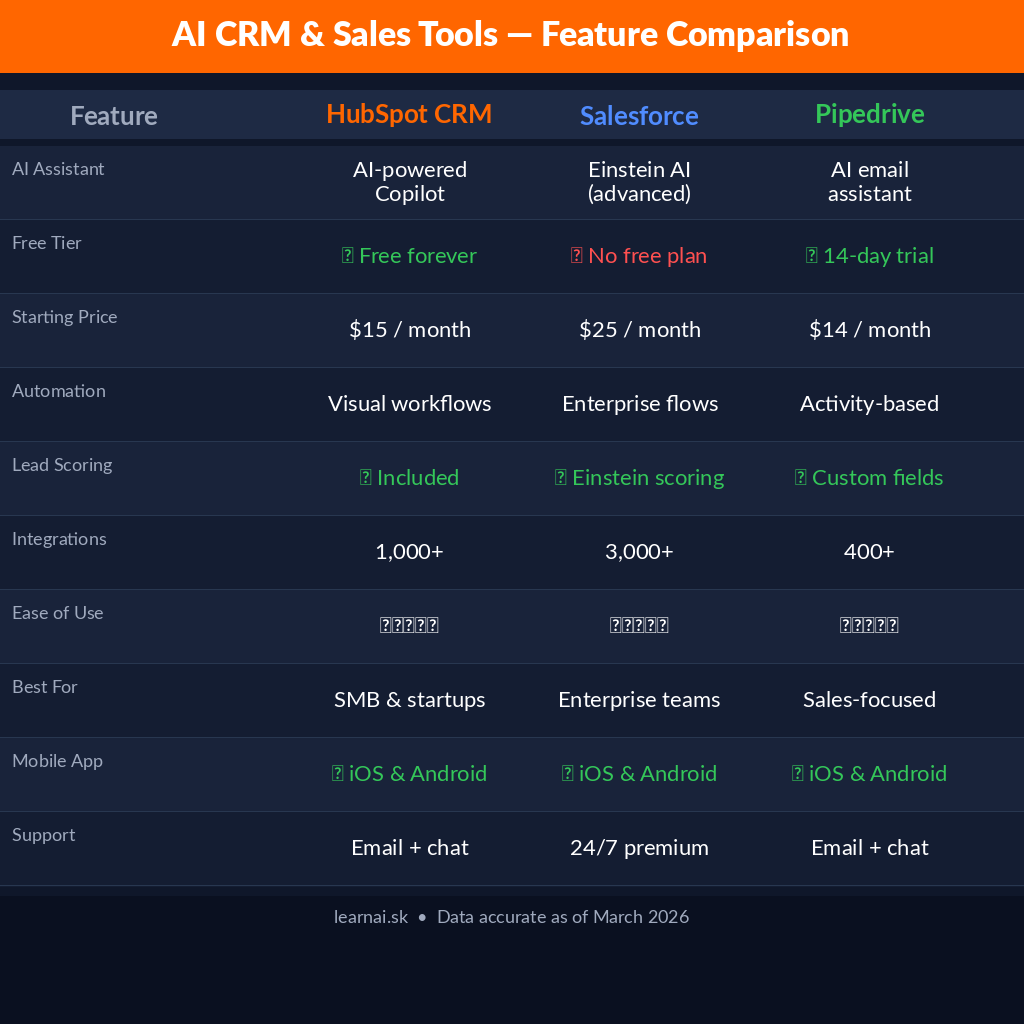
HubSpot (AI-Powered CRM)
HubSpot’s 2026 AI layer covers the entire sales funnel: lead scoring, email personalisation, meeting booking, deal prediction, and follow-up automation. The Breeze AI assistant generates personalised outreach, summarises call recordings, and suggests next actions for each deal.
65% of B2B companies use AI-assisted lead prioritisation in 2026 — HubSpot’s implementation is one of the most mature and accessible.
- Pricing: Free CRM with paid tiers from $45/month; full AI features on Professional ($800/month+)
- Best for: SMB to mid-market companies wanting an all-in-one CRM + marketing + sales platform
- Strengths: Best-in-class onboarding, comprehensive documentation, large integration ecosystem
- Watch out for: Cost scales quickly; enterprise features require expensive Sales Hub tiers
Salesforce (Einstein AI)
Salesforce Einstein is the gold standard for enterprise AI in sales. It offers predictive lead scoring, opportunity insights, automated data entry from emails and calls, and an AI copilot (Einstein Copilot) that works across the entire Salesforce platform.
50% of enterprise sales teams rely on predictive opportunity scoring — Salesforce Einstein is the most widely deployed solution in that category.
- Pricing: Einstein features add $50–75/user/month on top of Salesforce base pricing
- Best for: Enterprise organisations with complex sales processes and significant Salesforce investment
- Strengths: Most powerful AI features; deeply embedded in enterprise workflows; strong compliance
- Watch out for: Expensive; complex implementation; overkill for small teams
Pipedrive (AI Assistant)
Pipedrive is a sales-focused CRM with a built-in AI assistant that provides deal recommendations, activity reminders, and pipeline health summaries. It’s the best choice for small sales teams who want CRM AI without the complexity of HubSpot or Salesforce.
- Pricing: From $14.90/user/month; AI features on Advanced plan ($27.90/user/month)
- Best for: Small to mid-size sales teams; pipeline-focused selling
Clay (AI Sales Research)
Clay automates prospect research and contact enrichment, combining 50+ data sources to build rich contact profiles automatically. AI-driven contact enrichment reduces manual research time by 30–40% — Clay’s automated version reduces it by 90%.
- Pricing: From $149/month; enterprise pricing on request
- Best for: Outbound sales teams; SDR automation; account-based selling
Key takeaway: HubSpot is the best choice for most growing businesses. Salesforce for enterprise. Clay for outbound teams who live in prospect research.
Category 2: AI for Marketing and Content
Jasper AI
Jasper AI is the leading AI writing platform for marketing teams, with brand voice training, 50+ templates, and native Surfer SEO integration. The Campaign feature generates a full asset suite from one brief — blog post, email, social posts, and ad copy in matching brand voice.
- Pricing: Creator $39/month; Pro $59/month (billed annually)
- Best for: Marketing teams needing consistent brand voice at scale
Canva AI (Magic Studio)
Canva’s Magic Studio suite includes 25+ AI-powered design features: Magic Write for copy, Magic Media for image generation, one-click video resizing, and Magic Design for complete campaign asset generation from a single brief.
- Pricing: Free tier; Pro $15/month; Teams $10/user/month
- Best for: Marketing teams without a dedicated designer
Semrush + AI Writing Assistant
Semrush’s 2026 AI integration combines SEO data with AI content generation. The ContentShake AI tool generates SEO-optimised articles based on real keyword data, while Semrush’s AI Writing Assistant suggests real-time improvements to existing content.
- Pricing: Semrush from $119/month; ContentShake AI included in higher tiers
- Best for: Content teams focused on organic search performance
Key takeaway: Jasper for brand-consistent content at scale. Canva for design. Semrush for SEO-first content production.
Category 3: AI for Operations and Automation
Zapier (AI Automation)
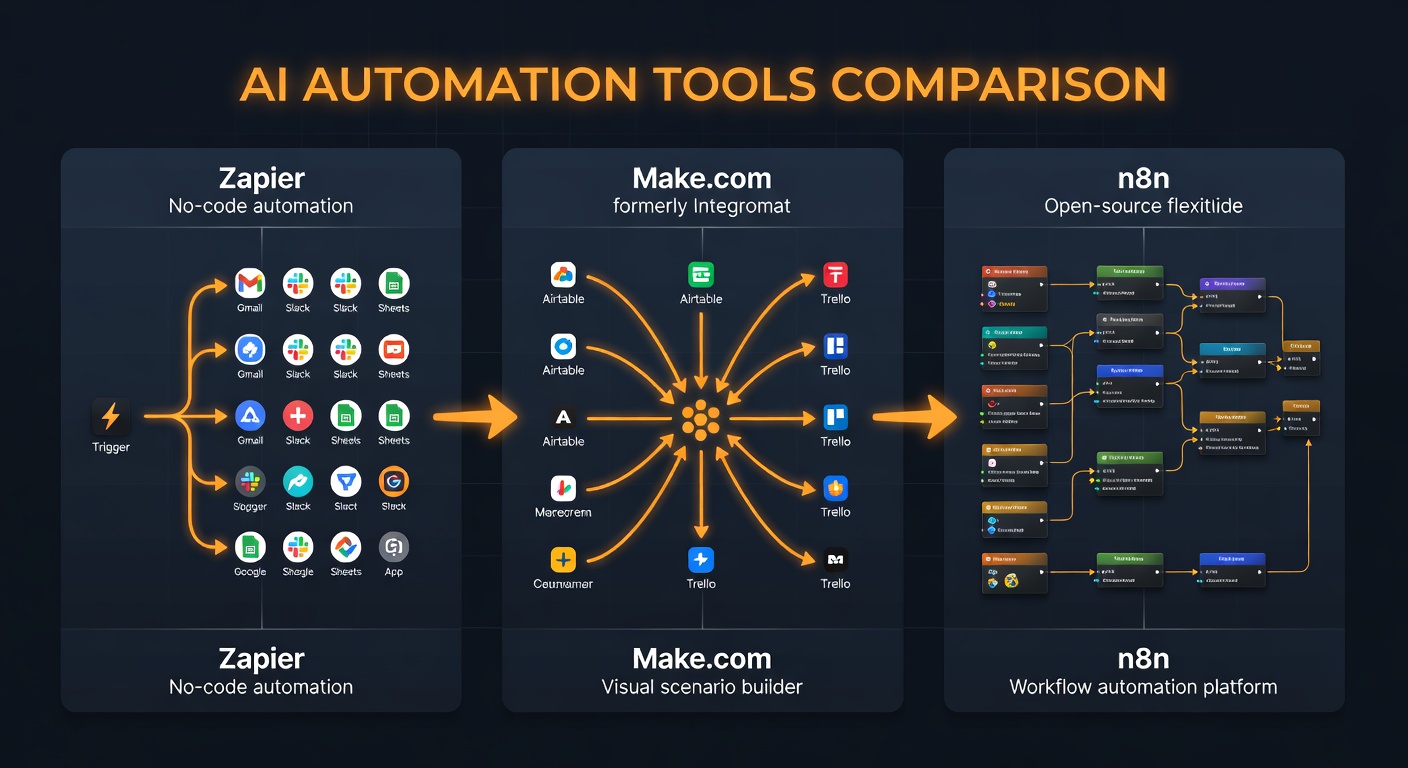
Zapier connects 7,000+ apps through automated workflows. The 2026 AI features include natural language automation building (describe what you want in plain English), AI steps in workflows (add LLM reasoning to any automation), and Zapier Agents for fully autonomous task handling.
- Pricing: Free (100 tasks/month); Starter $19.99/month; Professional $49/month
- Best for: Non-technical teams automating cross-app workflows
Make.com (Formerly Integromat)
Make.com offers more complex workflow logic than Zapier at a lower price point. Its AI modules connect to GPT-5 and Claude APIs, enabling AI-powered transformations within any workflow. The visual builder handles multi-step conditional logic that Zapier’s simpler interface can’t match.
- Pricing: Free (1,000 operations/month); Core $9/month; Pro $16/month
- Best for: Teams needing complex conditional logic at lower cost than Zapier
n8n (Self-Hosted or Cloud)
n8n is the developer’s choice for AI automation: open-source, 400+ integrations, and an AI Agent node that adds autonomous reasoning to any workflow. Self-hosted n8n is completely free. Cloud plans start at $20/month.
- Pricing: Free (self-hosted); Cloud from $20/month
- Best for: Technical teams wanting maximum flexibility and control
ClickUp AI
ClickUp combines project management with AI: the AI assistant writes task descriptions, summarises project updates, generates action items from meeting notes, and identifies scheduling conflicts. For project-heavy teams, it reduces administrative overhead significantly.
- Pricing: AI add-on is $5/user/month on top of ClickUp plans (Business from $12/user/month)
- Best for: Project-driven teams needing AI within their PM workflow
Key takeaway: Zapier for non-technical teams, Make.com for complex logic at lower cost, n8n for developers wanting full control.
Category 4: AI for Customer Service
Intercom (Fin AI Agent)
Intercom’s Fin is the leading AI customer service agent in 2026. It handles Tier-1 support questions autonomously, escalates complex issues to human agents, and learns from every interaction. Businesses using Fin report resolving 40–60% of support tickets without human intervention.
- Pricing: $39/seat/month; Fin resolution fee model available
- Best for: SaaS companies and e-commerce with high support volume
Zendesk AI
Zendesk’s 2026 AI features include intelligent ticket routing, automated reply suggestions, agent copilot mode, and self-service bots. The AI triages incoming requests, suggests KB articles, and drafts responses for human agents to review and send.
- Pricing: Suite Team $55/agent/month; Suite Growth $89/agent/month
- Best for: Mid-market and enterprise support operations
Freshdesk (Freddy AI)
Freshdesk’s Freddy AI offers similar functionality to Zendesk at a lower price point. Strong for SMBs that need AI-powered customer service without enterprise pricing.
- Pricing: From $15/agent/month; Freddy AI included on higher tiers
- Best for: SMBs wanting AI customer service at accessible pricing
Key takeaway: Intercom Fin for the best autonomous resolution rate. Zendesk for enterprise compliance and workflow complexity. Freshdesk for SMBs on budget.
Category 5: AI for Finance and Analytics
Notion AI
Notion AI adds intelligence to every aspect of your workspace: it summarises meeting notes, drafts documents, answers questions about your company data, and auto-fills database properties. For knowledge-intensive businesses, Notion AI reduces the time spent searching and synthesising information.
- Pricing: AI add-on $8/user/month on top of Notion plans
- Best for: Knowledge-intensive businesses; startups; remote teams
Gamma (AI Presentations)
Gamma generates professional presentations, documents, and webpages from a text prompt or an existing document. For business teams that need presentation-quality outputs quickly, Gamma produces polished decks in minutes.
- Pricing: Free tier; Pro $8/month
- Best for: Sales teams, consultants, business development
Power BI + Copilot
Microsoft’s Power BI Copilot lets business users query data in natural language: “Show me revenue by region for Q1 2026 vs Q1 2025” generates the chart automatically. For organisations already in the Microsoft 365 ecosystem, Copilot features extend across Excel, Word, PowerPoint, and Teams.
- Pricing: Included in Microsoft 365 Copilot at $30/user/month
- Best for: Enterprises with heavy Microsoft 365 investment
Category 6: AI for Team Productivity
Microsoft Copilot 365
The most broadly deployed AI productivity suite in 2026. Copilot integrates with Word (drafts documents), Excel (analyses data, generates formulas), PowerPoint (creates slides), Teams (transcribes and summarises meetings), and Outlook (drafts emails, summarises threads).
- Pricing: $30/user/month added to Microsoft 365 Business Premium
- Best for: Enterprises already using Microsoft 365
Google Workspace + Gemini
Google’s equivalent: Gemini integrates with Docs, Sheets, Gmail, Meet, and Drive. The 2026 Gemini integration is stronger than earlier versions — particularly for Google Docs writing assistance and Gmail smart compose.
- Pricing: Gemini Business $22/user/month added to Workspace
- Best for: Organisations standardised on Google Workspace
Notion AI
Notion AI at the team level provides a shared intelligent workspace: meeting summaries, project documentation, knowledge base Q&A, and automated database maintenance. Flexible enough for any team structure.
- Pricing: $8/user/month add-on
- Best for: Flexible, cross-functional teams
Master Comparison Table
| Tool | Function | Best For | Pricing Start |
|---|---|---|---|
| HubSpot AI | Sales/CRM | SMB to mid-market CRM + marketing | Free / $45/month |
| Salesforce Einstein | Sales/CRM | Enterprise sales complexity | $50/user add-on |
| Clay | Sales research | Outbound SDR automation | $149/month |
| Jasper AI | Marketing/Content | Brand-consistent content at scale | $39/month |
| Canva AI | Marketing/Design | Design at scale, no designer | Free / $15/month |
| Semrush AI | Marketing/SEO | SEO-driven content production | $119/month |
| Zapier AI | Automation | Non-technical cross-app automation | Free / $19.99/month |
| n8n | Automation | Developer-grade AI workflows | Free (self-hosted) |
| Intercom Fin | Customer Service | Autonomous support resolution | $39/seat/month |
| Zendesk AI | Customer Service | Enterprise support operations | $55/agent/month |
| Microsoft Copilot 365 | Productivity | Microsoft 365 enterprises | $30/user/month |
| Google Workspace Gemini | Productivity | Google Workspace organisations | $22/user/month |
| Notion AI | Productivity | Knowledge-intensive teams | $8/user/month |
How to Build Your AI Business Stack
The Lean Startup Stack ($0–200/month)
Notion AI ($8/user) for team knowledge + Canva free tier for design + Zapier free tier for automation + Claude.ai for writing and research. This stack covers core business AI needs at minimal cost.
The Growth Company Stack ($200–500/month)
HubSpot CRM (free) + Jasper Pro ($59) + Make.com Pro ($16) + Intercom basic tier + Notion AI. Covers sales, marketing, automation, and customer service.
The Enterprise Stack ($500+/month/user)
Salesforce + Einstein AI + Microsoft 365 Copilot + Zendesk AI + custom n8n pipelines. Full coverage across all business functions with enterprise compliance.
The most important principle when building your stack: integrate before you add. Each new tool only earns its place if it deepens integration with your existing stack — not if it sits in isolation.
Common Mistakes When Adopting AI Tools
Buying features instead of solving problems. Start with your biggest operational bottleneck and find the best tool to solve it. Don’t add tools because they sound impressive.
Underestimating data preparation. AI tools are only as good as the data they access. CRM AI requires clean CRM data. Marketing AI requires consistent content and audience data. Budget for data cleanup before tool deployment.
Skipping change management. AI tools fail not because they don’t work, but because teams don’t adopt them. Budget for training and internal champions.
Overlapping tools. HubSpot and Salesforce overlap significantly. Zapier and Make.com overlap significantly. Choose one in each category and integrate deeply rather than running parallel systems.
FAQ
What AI business tools have the fastest time to value?
Canva AI (design results in minutes), Zapier AI (automations active in hours), and Notion AI (useful from day one) have the fastest time to value. Tools like Salesforce Einstein require months of data before showing meaningful predictions.
Is Microsoft Copilot 365 worth the $30/user/month?
For organisations already deep in Microsoft 365, yes — particularly for knowledge workers who spend significant time in Word, Excel, and Teams. The ROI calculation: if Copilot saves 1 hour/day per user at $50/hour labour cost, it pays for itself in 72 minutes of saved time.
How do AI business tools handle data privacy?
Enterprise tools like Microsoft Copilot and Salesforce Einstein have strong data isolation and compliance features. Smaller SaaS tools vary widely — always review the data processing agreement. For sensitive data, self-hosted options (n8n, Dify) ensure data stays on your infrastructure.
Can small businesses afford AI business tools?
Yes. Most categories have free or freemium options: HubSpot CRM (free), Canva (free), Zapier (free tier), Claude.ai (free tier), Notion (free tier). A capable AI business stack can cost $0–50/month for a small team just getting started.
What’s the single best AI business tool to start with?
Start with the tool that addresses your biggest daily bottleneck. If you spend too much time writing, start with Claude or Jasper. If email overwhelms you, start with a Zapier automation. If your design takes too long, start with Canva AI. Solve your highest-friction problem first.
Conclusion
AI business tools in 2026 cover every function of modern business. The question is no longer whether to adopt AI — 75–85% of businesses already have. The question is which tools to deploy in which order to maximise ROI within your constraints.
Start with your highest-friction function. Pick the tool with the best integration for your existing stack. Measure impact before adding the next tool. Build incrementally rather than trying to transform everything at once.
For more on how to apply AI strategically across your business, visit Learn AI: The Complete Guide — learnAI’s foundational resource for business AI adoption.
Ready to learn AI? Join the learnAI community → learnAI Skool Community
Deeper Comparison: Automation Tools for Business
The automation category deserves extra attention because the right choice here multiplies the value of every other tool in your stack.
Zapier vs Make.com vs n8n: Which to Choose?
All three tools connect apps and automate workflows with AI capabilities. The decision comes down to technical skill, budget, and complexity requirements.
Zapier wins on ease of use and breadth of integrations (7,000+ apps versus Make.com’s 1,400). If your team has no developers and needs to be productive quickly, Zapier is worth the premium. The AI Copilot feature lets you describe an automation in plain English and get a working Zap in seconds.
Make.com offers more complex logic at lower cost. Conditional branching, data transformation, and multi-step error handling are all more capable in Make. For operations teams with moderate technical skills, Make.com delivers more per dollar.
n8n is the clear winner for developer teams and organisations that want full control. Self-hosted n8n runs on a $5/month VPS with zero usage limits. Its AI Agent node is one of the most powerful free automation tools available. The trade-off: you manage your own infrastructure and updates.
A practical approach for growing businesses: start with Zapier for quick wins, migrate complex workflows to Make.com as volume grows, and add n8n for developer-built pipelines where cost or control matters.
Key Automation Use Cases by Business Size
Solopreneurs and freelancers: Zapier free tier + Notion AI. Automate lead capture, invoice reminders, and content distribution. Total cost: $0–8/month.
10–50 person teams: Make.com Pro + HubSpot AI + Notion AI. Automate CRM updates, marketing sequences, and team documentation. Total cost: $75–150/month.
50–500 person organisations: n8n cloud + Salesforce or HubSpot + dedicated AI tools per function. Enterprise-grade automation with full customisation. Total cost: varies significantly by stack.
AI Tools Adoption Roadmap for Businesses
Most businesses try to adopt too many AI tools at once and end up with a fragmented stack that nobody uses consistently. A phased approach delivers better results.
Phase 1: Foundation (Month 1–2)
Adopt AI for your highest-volume, lowest-risk function. For most businesses, this is either email (Gmail AI/Outlook Copilot) or content creation (Claude or Jasper). Measure time saved per week. Build the habit of AI-first workflows before adding more tools.
Phase 2: Core Functions (Month 3–4)
Expand to CRM (HubSpot AI or Salesforce Einstein) and automation (Zapier or Make.com). These tools connect your existing data to AI, dramatically increasing the value of the AI layer. Focus on automation that removes the most manual repetitive work.
Phase 3: Scaling (Month 5+)
Add specialised tools for functions where you have clear ROI from Phase 1 and 2. Customer service AI (Intercom Fin), advanced analytics (Power BI Copilot), or deeper marketing AI (Semrush ContentShake). By this point, your team has developed AI workflows and is ready to leverage more sophisticated tools.
The businesses that see 37% cost savings and 15% revenue uplift from AI adoption are the ones who followed a disciplined adoption roadmap — not the ones who bought 10 tools simultaneously.
Pricing Reality Check: What AI Business Tools Actually Cost
Published pricing rarely tells the full story. Here’s a realistic cost breakdown for different business sizes:
Solo / Freelancer AI Stack:
- Claude.ai Pro: $20/month
- Notion AI: $8/month
- Canva Pro: $15/month
- Zapier Starter: $19.99/month
- Total: ~$63/month
Small Team (5 people) AI Stack:
- HubSpot Starter (2 users): $45/month
- Jasper Creator: $39/month
- Make.com Pro: $16/month
- Notion AI (5 users): $40/month
- Intercom Starter: $74/month
- Total: ~$214/month (vs. ~$600/month for 5 full-time assistants)
Mid-Market (50 people) AI Stack:
- HubSpot Professional: $800/month
- Salesforce + Einstein (20 users): $2,000/month
- Microsoft 365 Copilot (50 users): $1,500/month
- Zendesk AI (10 agents): $890/month
- n8n Cloud: $50/month
- Total: ~$5,240/month (vs. $250,000+ in equivalent human labour)
The ROI case for AI business tools is compelling at every scale — provided you choose tools that integrate with your existing stack and measure their impact consistently.
Synthesia and Video AI: The Emerging Business Category
Video content is the highest-engagement format in business communication — and it’s historically been the most expensive to produce. AI video tools are changing this equation rapidly.
Synthesia remains the market leader: upload a script, choose an AI avatar, and receive a professionally produced video in minutes. 200+ avatar options, 120+ languages, and the ability to update videos without re-recording make it invaluable for teams producing training content, product demos, or localised marketing materials.
Runway Gen-3 handles more creative video applications: style transfer, background removal, video extension, and text-to-video generation. For marketing teams producing social video content, Runway has replaced traditional video editors for a significant portion of output.
HeyGen specialises in personalised video at scale — generating thousands of customised video messages with different names, company details, and specific value propositions for each recipient. SDR teams using HeyGen for personalised video outreach report 3–5x response rate improvements over text-only cold outreach.
The business ROI calculation for AI video is straightforward: a 2-minute explainer video that previously cost $2,000–5,000 in production costs can now be produced in 20 minutes for $15 via Synthesia. For any business producing regular video content, the ROI is immediate.
Additional FAQ
Which AI business tools are best for small businesses with limited budgets?
Start with tools that have meaningful free tiers: HubSpot CRM (free forever), Notion AI (free tier), Canva (free tier), Zapier (100 free tasks/month), and Claude.ai (free tier). A capable small business AI stack costs $0 to start and scales as your needs grow.
How do AI tools integrate with existing business software?
Most modern AI tools offer native integrations via APIs or direct connectors. Zapier and Make.com serve as integration layers when direct connections don’t exist. The key is choosing AI tools that offer pre-built integrations with your existing stack — not ones that require custom development.
Will AI business tools eliminate jobs?
AI tools eliminate specific tasks and roles, not entire job functions. The research shows that most knowledge workers who adopt AI tools become significantly more productive rather than being replaced — particularly in writing, research, data analysis, and routine customer communication. The risk is being slower to adopt than your competitors.